Why Digital Time Capsules Matter in 2026
In a world that’s increasingly digital, our most cherished moments often get lost in endless photo galleries and fleeting social media posts. That’s where digital time capsules come in, a powerful, emotional, and futuristic way to lock away your memories until a special day. Whether you’re archiving a trip, a message to your future self, or the early years of your child’s life, TimeLock makes the entire process intuitive, meaningful, and secure.
In this step-by-step tutorial, we’ll walk you through exactly how to create your own digital time capsule using TimeLock. We’ll also explain each stage using real in-app screenshots so you can follow along with ease.
Whether you’re new to digital memory preservation or looking for the best time capsule app in 2026, this guide has everything you need.
Step 1: Start Your Time Capsule & Choose the Type
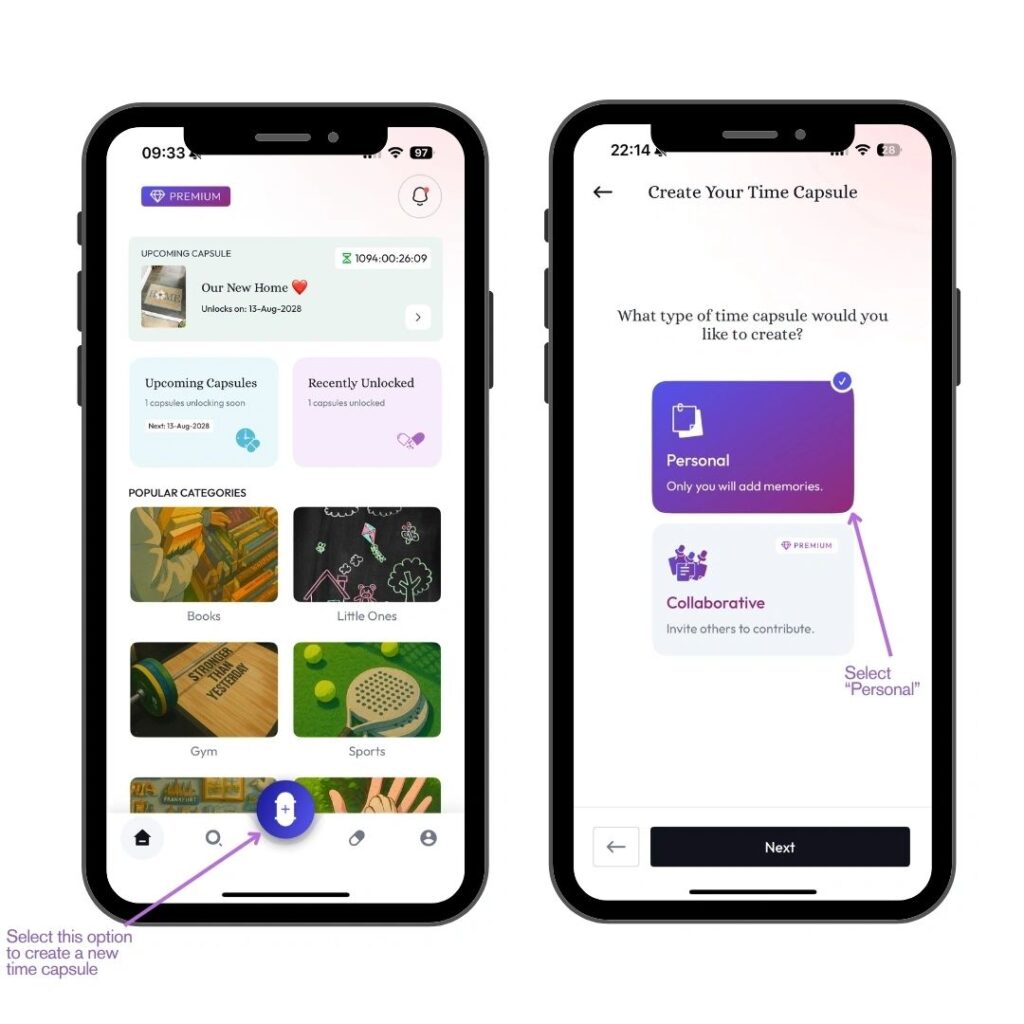
(Screenshot: Central button + selection of Personal vs Collaborative)
To begin your journey, open the TimeLock app and tap the central capsule icon located in the navigation bar. This instantly launches the capsule creation process.
The first decision you’ll be prompted to make is the type of capsule:
- Personal: Only you will be able to add and view the contents.
- Collaborative (Premium): Invite friends, family, or loved ones to contribute their own memories.
Choosing the right capsule type sets the tone. For example, a solo travel diary or a message to your future self is perfect for Personal. For group events like weddings, shared holidays, or memorial projects, Collaborative is ideal.
Step 2: Choose Your Capsule Background
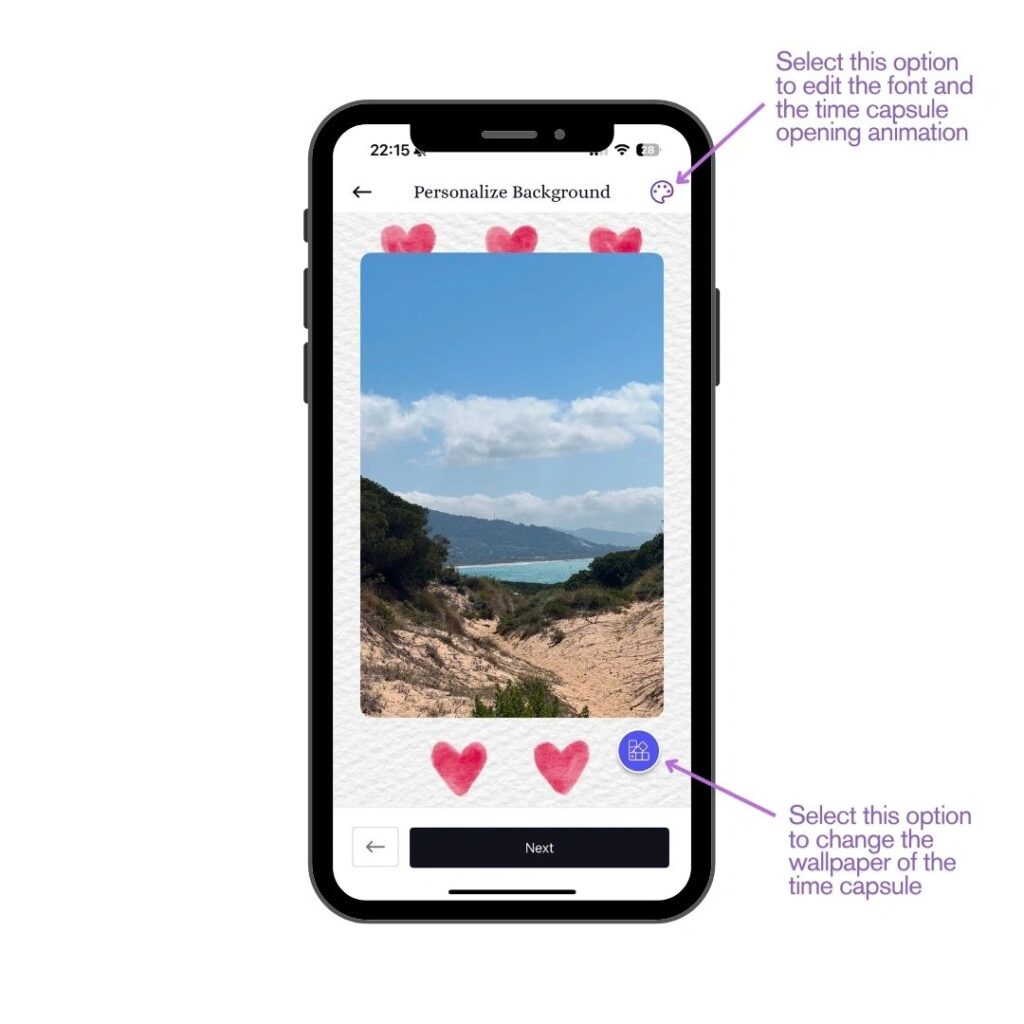
(Screenshot: Personalise Background page with edit options)
Now that you’ve selected your capsule type, it’s time to customise the visual experience.
This stage allows you to change the background wallpaper of your time capsule, think of it like setting the mood or theme of your vault. The background gives emotional context and instantly makes the capsule feel more unique and personal.
Choose from a wide selection of illustrated or photographic backgrounds that reflect the story you’re preserving. It could be:
- A serene landscape for a travel memory
- A beachside moment for a summer diary
- A heartfelt visual for a message to a loved one
- Or even a symbolic backdrop for a gym transformation or goal capsule
This helps visually anchor your memories to the theme of your journey, enhancing the storytelling.
Step 3: Select a Time Capsule Theme (The Cover Art)
(Screenshot: The theme selection grid)
Beyond background customisation, TimeLock lets you choose a Time Capsule Theme, which acts as the main visual cover that represents the entire capsule.
Think of this as the “book cover” of your memory vault. It’s the image you’ll see when browsing your capsules in the app, the first thing that captures the essence of what’s inside.
TimeLock offers stunning illustrated themes across various categories:
- Romantic themes (e.g., love locks over water)
- Fitness goals (e.g., gym setups)
- Travel imagery (e.g., plane windows, nature trails)
- Everyday life (e.g., bike rides, freedom, family)
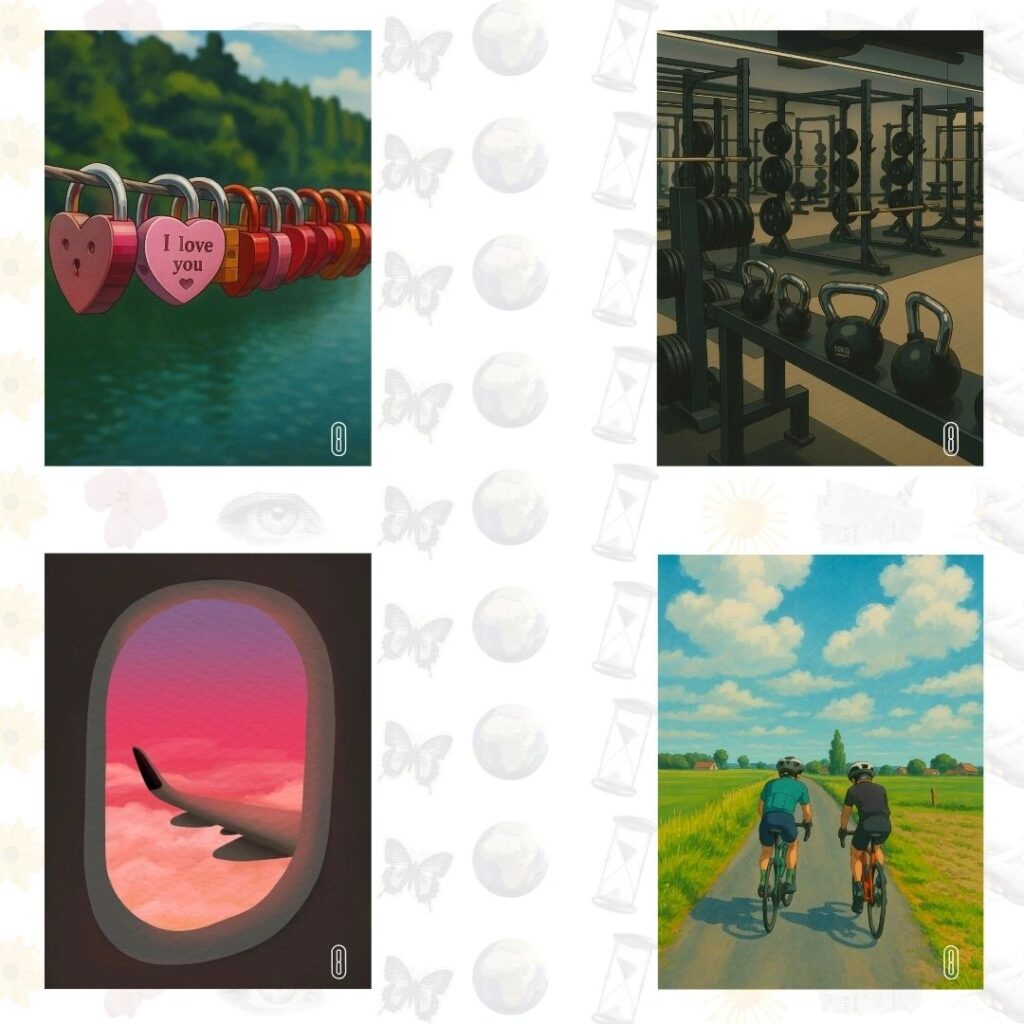
Choosing the right theme helps convey the intent of the capsule. For example, a “window seat” image might be used for a trip you’re documenting, while “I love you” locks might be used for a sealed letter to a partner or future child.
Step 4: Personalise Fonts and Opening Animation
(Screenshot: Font and Effects settings menu)
Once your visual style is set, you can fine-tune the appearance of the capsule’s internal content.
Tap the top-right palette icon to access:
- Font Options: Choose the typography that matches your mood, whether it’s minimalist and modern or expressive and handwritten.
- Effects: Add subtle animations or background effects, such as falling blue wrinkles or glowing particles that play when the capsule opens.
- Intro Animation Toggle: Enable or disable a dramatic entry animation for the moment the capsule is unlocked.
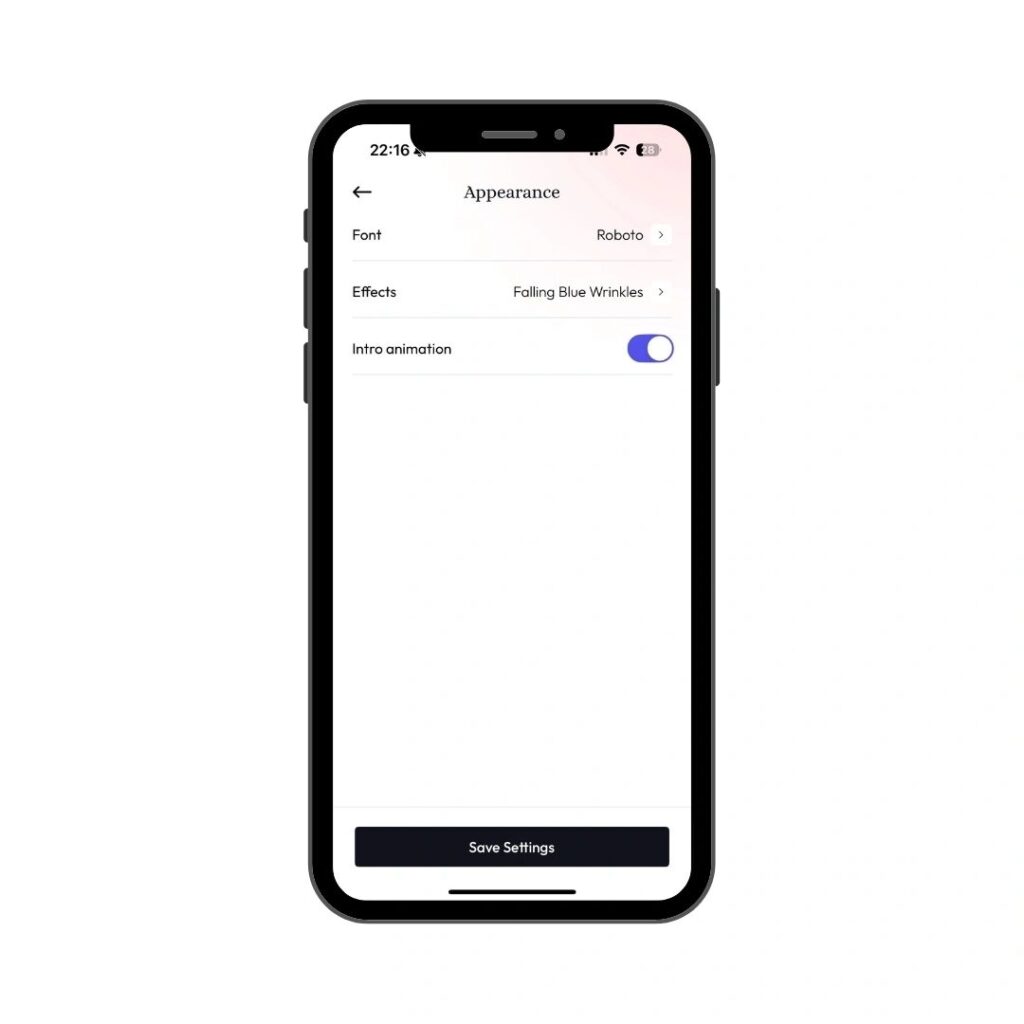
This layer of detail makes each digital capsule feel handcrafted. It’s not just about content, it’s about creating an experience for your future self (or someone else) when they open the capsule years later.
Step 5: Add Content to Your Time Capsule
(Screenshot: Capsule contents with written notes and photos + warning message popup)
This is the heart of your time capsule. Here, you can upload and arrange the content you want to preserve.
Supported content includes:
- Photos
- Videos
- Audio recordings
- PDFs and documents
- Text notes or letters
- Dates, captions, and memory descriptions
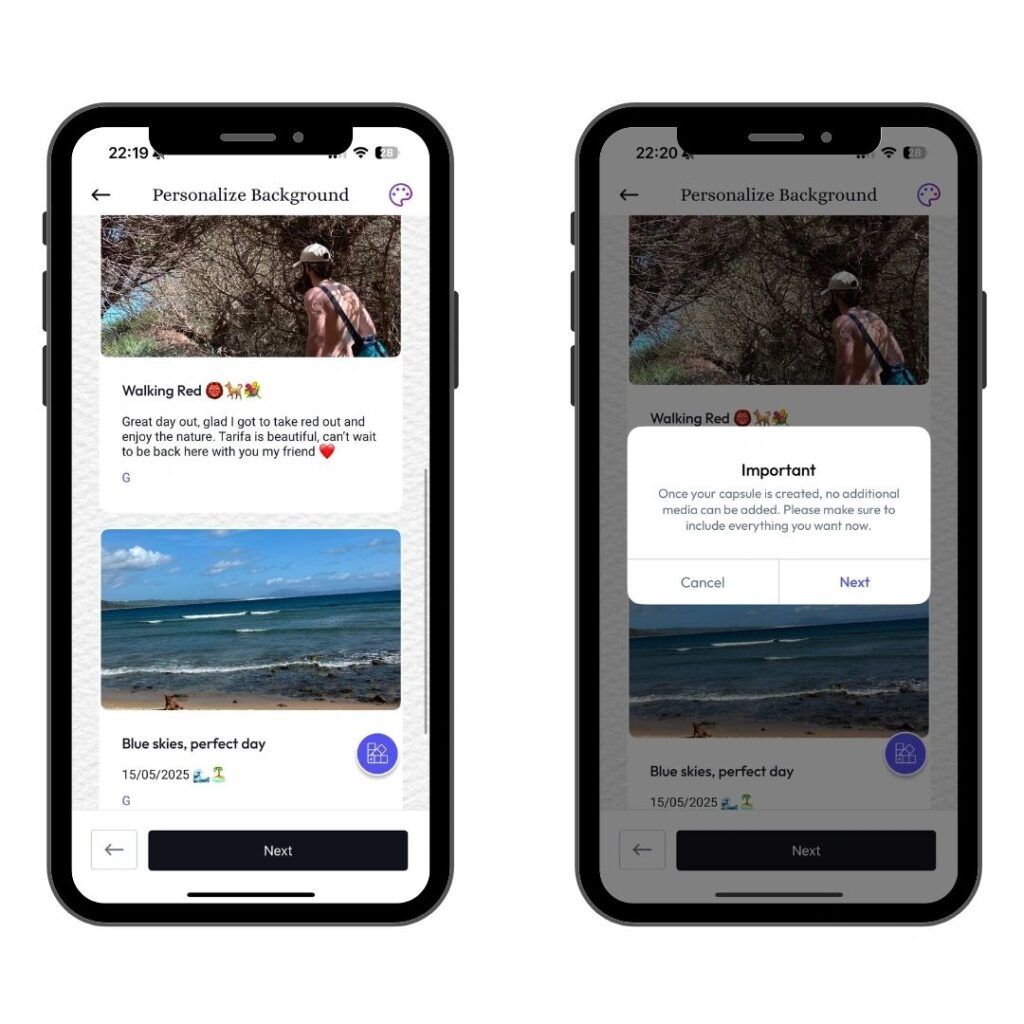
Add as much or as little as you’d like; this is your digital shoebox of memories.
Once you’re finished, tap “Next”, but be aware: a pop-up will warn you that once you create the capsule, no new content can be added or removed.
This design choice is intentional. It mimics the nature of a real-world time capsule, sealed, untouched, and preserved exactly as it was when created. It ensures emotional integrity and adds gravity to the process. You’re locking away a moment in time forever.
Step 6: Choose a Future Date or Milestone to Unlock
(Screenshot: Calendar view + milestone toggle + countdown screen)
Now it’s time to decide when your capsule will be unlocked.
You can choose between:
- Date: Set a specific day and year in the future.
- Milestone: (Coming soon) Tie the unlock to a major life event like graduation, moving abroad, an anniversary, or a goal achieved.
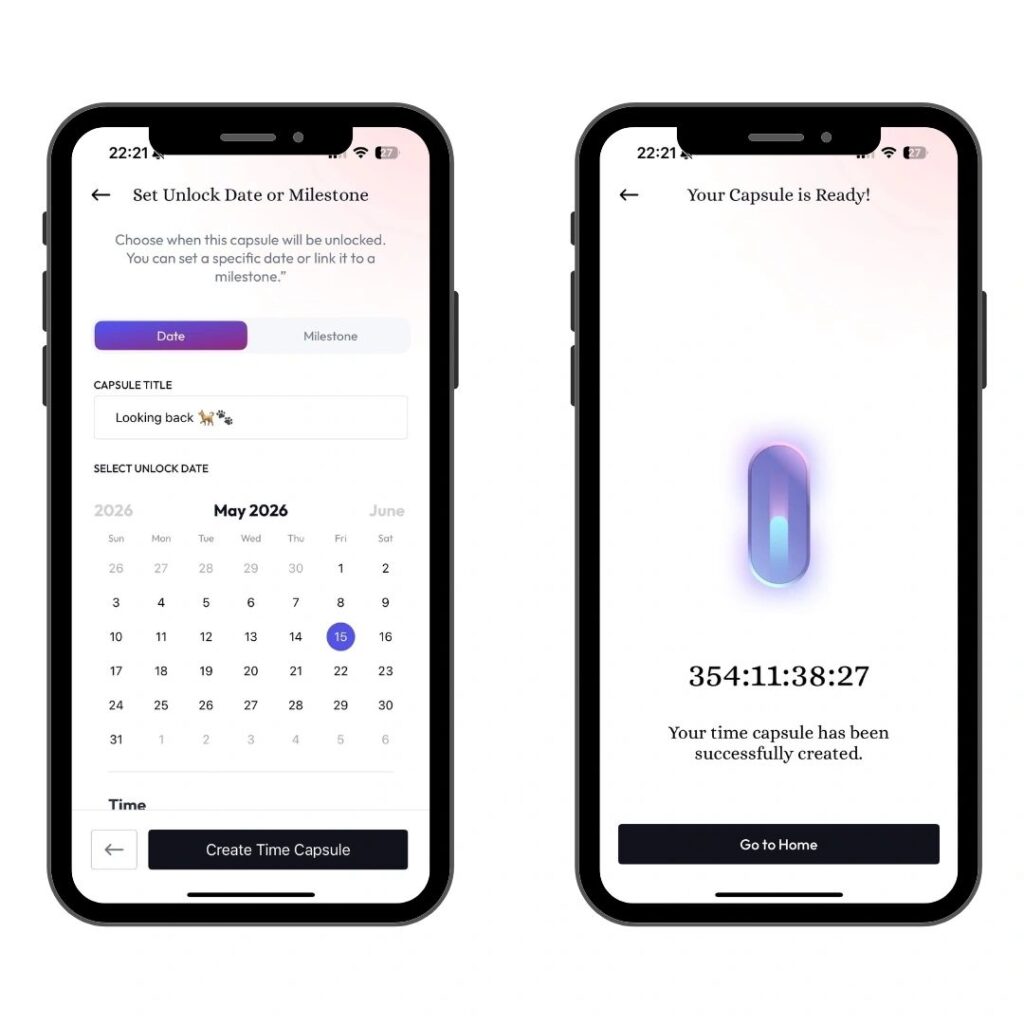
You’ll also give your capsule a title, make it something meaningful like “Open on Graduation Day,” “For My Future Self,” or “Memories from Summer 2025.”
Once you hit “Create Time Capsule,” your memories are sealed, and the countdown begins.
This countdown timer, which displays days, hours, and seconds, builds emotional anticipation and makes the experience feel real. Every time you open the app, you’ll be reminded that something meaningful is waiting for you on the other side of time.
What Is a Digital Time Capsule and Why Should You Create One?
Creating a digital time capsule isn’t just a gimmick; it’s an emotional act of preservation.
In a world full of distractions and superficial content, TimeLock offers something different: depth, meaning, and memory.
Whether you’re documenting a life chapter, capturing a special moment, or simply leaving behind messages for your future self, the process of building a capsule forces you to be intentional. It invites you to pause, reflect, and cherish the moment you’re living in.
And because the capsule is locked and untouchable until your chosen future date, the excitement only grows as time passes. It’s a gift for your future self, or for someone you love.
From personal journaling and romantic gestures to legacy messages and goal reminders, digital time capsules are the future of meaningful content creation.
Final Thoughts: TimeLock Is the Ultimate Digital Time Capsule App in 2026
With a sleek interface, powerful customisation, and an emotionally-driven user experience, TimeLock has set a new standard for what memory preservation should look like in the digital age.
Unlike traditional photo apps or cloud storage, TimeLock doesn’t just store your memories; it celebrates them. And more importantly, it makes sure they resurface at exactly the right moment.
If you’re looking to create a digital time capsule in 2026, whether for yourself or a loved one, TimeLock is the most complete, beautifully designed tool available today.
Related Blog Posts to Explore
- How TimeLock Is Changing the Way We Remember
- Why Gen Z Is Ditching Social Media for Time Capsules
- The Rise of MemoryTech: Apps That Preserve Your Life
- The Strangest Items Ever Found in Time Capsules
Join us on the mission.
LinkedIn | Instagram | Pinterest
Want a seasonal angle? Try our guide on how to make a time capsule for the new year.